If you've tried building multi-agent AI systems, you've probably hit the same wall I did.
You need orchestration. Real orchestration. Not just "call this agent, then that agent." You need state management, conditional routing, parallel execution, and the ability to recover when things go wrong.
LangGraph promises exactly this. It's become the go-to framework for workflow orchestration in AI systems. The graphs, the state machines, the conditional edges — it's powerful.
But there's a problem.
The Problem No One Talks About
Every LangGraph tutorial I found uses direct API calls.
You define a node, it calls the model API, it returns a response. Simple.
But also expensive. You're burning tokens while you experiment. While you learn. While you figure out if this approach even works for your use case.
The Hidden Cost
Direct API calls give you raw model responses. You lose the agent capabilities that make Claude actually useful — the tool execution, the context management, the built-in reasoning patterns.
I wanted LangGraph's orchestration power combined with Claude Agent SDK's full agent capabilities.
I couldn't find anyone teaching this.
What I Tried First
Before finding this pattern, I experimented with other approaches:
- Instruction files for sub-agents — You can give Claude instructions to spawn and manage sub-agents. It works for simple cases, but orchestration logic gets messy fast. The model is guessing at workflow control, not following a defined graph.
- RAG-based routing — Vector databases, markdown files, YAML configs. Feed context to the model and let it decide what to do next. Again, this works, but it's not deterministic. You can't reliably predict or debug the flow.
- Claude as the orchestrator — Let the model itself be the orchestrator, calling other agents as tools. This is elegant conceptually but falls apart when you need complex state management or parallel execution.
They all worked. Kind of.
None of them gave me what I actually needed: deterministic workflow control with full agent capabilities at each step.
The Discovery
The insight was simple once I saw it:
Key Insight
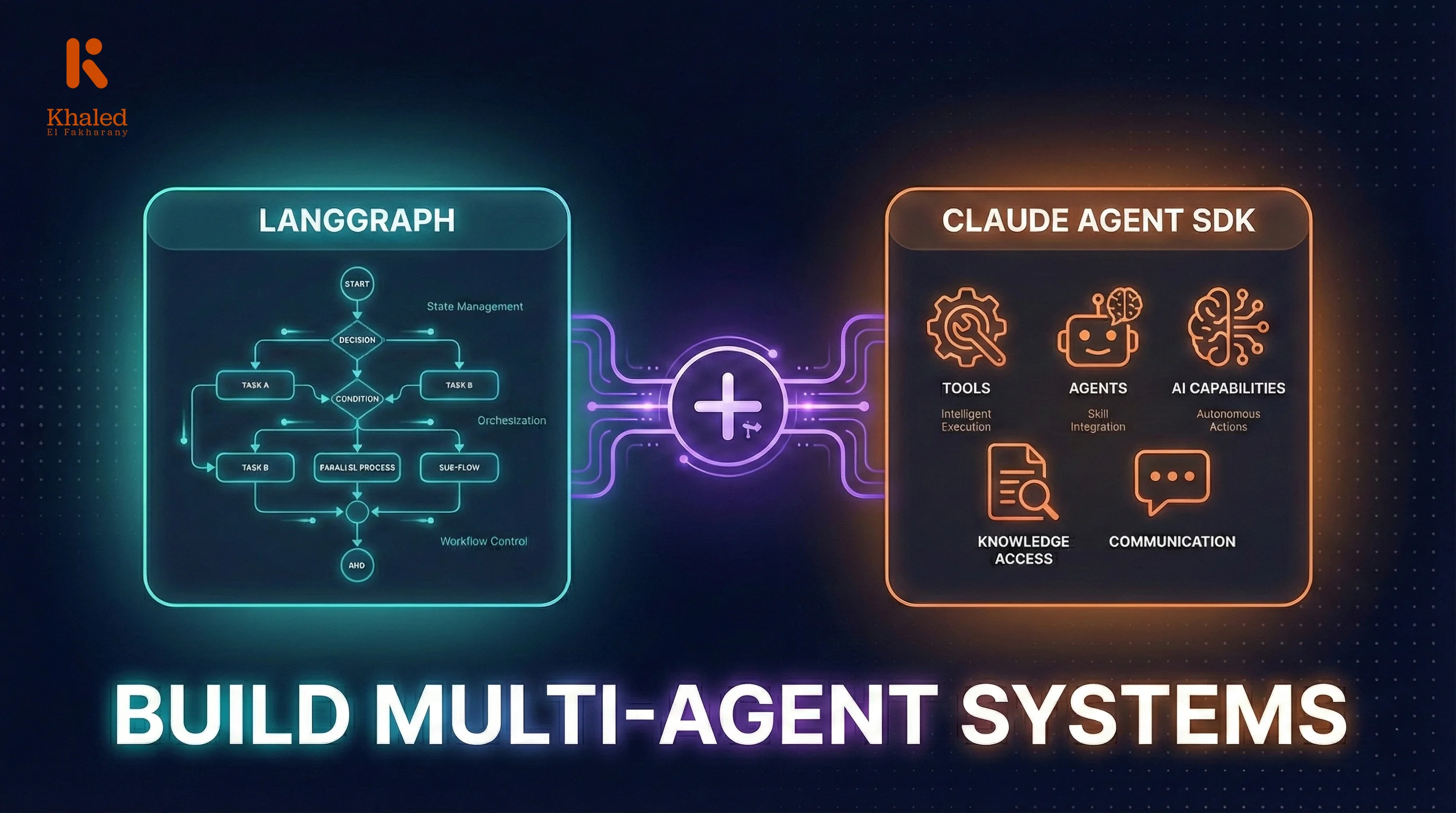
LangGraph and Claude Agent SDK operate at different levels. LangGraph handles workflow orchestration — what runs when, under what conditions, with what state. Claude Agent SDK handles agent execution — how the agent runs, with what tools, with what context. They don't compete. They complement.
What if each LangGraph node was powered by a Claude Agent SDK call? LangGraph controls the flow. The SDK executes each step with full agent capabilities.
The Architecture
Here's the mental model:
LangGraph Layer
Workflow Orchestration
State Management
Track data flowing through workflow
Routing Logic
Conditional edges and branching
Parallel Execution
Run multiple nodes concurrently
Claude Agent SDK Layer
Agent Execution
Tool Access
WebSearch, Read, Write, etc.
Context Management
Session state and memory
Model Selection
Haiku, Sonnet, or Opus per task
LangGraph defines the workflow graph — nodes, edges, state schema, conditional routing.
Each node is a Python function that calls Claude Agent SDK.
The SDK agent executes with full capabilities — tools, context, whatever that specific step needs.
Results flow back to LangGraph state.
Conditional edges route based on state — and you can even use another SDK agent to make routing decisions.
The Core Pattern
Here's the simplified pattern that makes this work:
from langgraph.graph import StateGraph, END
from claude_code_sdk import query, ClaudeCodeOptions

async def run_sdk_agent(prompt: str, tools: list, model: str) -> dict:
    """Wrapper to run Claude Agent SDK and return structured output"""
    options = ClaudeCodeOptions(
        model=model,
        allowed_tools=tools,
        permission_mode="bypassPermissions"
    )

    output = ""
    async for message in query(prompt=prompt, options=options):
        if message.type == 'result' and message.subtype == 'success':
            output = message.result

    return {"success": True, "output": output}


async def research_node(state: WorkflowState) -> dict:
    """LangGraph node powered by Claude Agent SDK"""
    result = await run_sdk_agent(
        prompt=f"Research the following topic: {state['user_input']}",
        tools=["WebSearch", "WebFetch"],
        model="claude-sonnet-4"
    )

    return {
        "research_output": result["output"],
        "current_step": "research_complete"
    }
The node function is just Python. LangGraph doesn't care what happens inside — it just expects a state update.
Inside, you call the SDK with whatever configuration that step needs. Different tools, different models, different system prompts.
The SDK handles the agent execution. LangGraph handles where to go next.
Why This Matters
This pattern unlocks several things:
| Benefit | Description |
|---|---|
| Tool Isolation | Each agent gets exactly the tools it needs. Your research agent has web access. Your analysis agent has none. |
| Model Optimization | Use Haiku for fast routing decisions. Sonnet for analysis. Opus for complex reasoning. |
| Parallel Execution | LangGraph supports parallel nodes natively. Spin up five research agents simultaneously. |
| State Visibility | LangGraph's state shows exactly what each agent produced. Debug, replay, inspect. |
| Deterministic Flow | The workflow is defined in code. No guessing about what the orchestrator will do next. |
What I Built With This
To validate this pattern, I built a complete multi-agent system: a startup due diligence platform.
It has 11 specialized agents:
Due Diligence Multi-Agent Architecture
11 Specialized Agents • LangGraph Orchestrated
The research agents run in parallel. The analysis agents process their outputs. The synthesis agents produce the final deliverable.
All orchestrated by LangGraph. All powered by Claude Agent SDK.
It works.
The Challenges
This isn't a silver bullet. There are tradeoffs:
- Complexity — You're managing two systems now. LangGraph for flow, SDK for execution. More moving parts.
- Latency — Each node is a separate SDK call. Network overhead adds up in long workflows.
- Error handling — You need to handle SDK errors within LangGraph nodes. Timeouts, rate limits, parse failures.
- State size — Accumulating agent outputs can grow large. You need to think about what to pass forward vs. what to summarize.
For simple linear pipelines, this is overkill. Just use the SDK directly. But for complex workflows with conditional branching, parallel execution, and multiple specialized agents — this pattern is worth the complexity.
When to Use This
Good fit:
- Complex multi-step workflows
- Conditional branching based on agent outputs
- Parallel agent execution with result aggregation
- Need for different tool access at different steps
- Production systems that need debuggability
Not needed:
- Simple linear agent pipelines
- Single-agent tasks
- Quick prototypes where you don't need workflow control
Want the Full Implementation?
I didn't just figure this out and move on.
While learning this pattern, I documented everything — the questions I asked, the mistakes I made, the architecture decisions, the code that actually works.
I turned my entire learning journey into an interactive workshop.
Build Multi-Agent AI Systems Workshop
Go from zero to a complete 11-agent system. Interactive simulations, real code, and three learning paths: Hands-On, Follow Along, or AI-Assisted.
Start the WorkshopNot slides. Not videos of me coding. Interactive simulations, chat-based learning, and challenges that push you to build it yourself.
You start from zero and build a complete multi-agent system. The same 11-agent due diligence platform I described above.
Three learning paths:
- 1Hands-On — Write every line yourself
- 2Follow Along — Step-by-step with provided code
- 3AI-Assisted — Copy prompts into your coding agent (Claude Code, Cursor, Copilot)
If this pattern interests you and you want the full implementation — the agent configurations, the state schemas, the error handling, the parallel execution setup — that's what the workshop covers.
TL;DR
- LangGraph handles orchestration (workflow, state, routing)
- Claude Agent SDK handles execution (tools, context, agent capabilities)
- Each LangGraph node can call the SDK for full agent power
- This gives you deterministic workflows with intelligent agents
- I built an 11-agent system with this pattern and documented the whole journey
If you've been struggling with multi-agent orchestration, this pattern might be what you're looking for.